The launch that provoked a response was a feature in an earlier post
✓ That means that while the U.S. government will complain about it, there
isn’t much else they can do. We’re watching to see just how close the
Russian satellite will get to its U.S. counterpart.
U.S. Officials Are Not Happy About Russia's Supposed 'Stalker' Satellite
The head of U.S. Space Command condemned the launch of the Russian satellite, describing the move as "irresponsible."
The Russian military satellite launched aboard a Soyuz rocket.Photo: Ministry of Defense of the Russian Federation
A
U.S. military general expressed frustration over a recently launched
Russian satellite that appears to be stalking a U.S. military satellite
in space.
In a recent interview
with NBC News, James Dickinson, commander of U.S. Space Command,
described the launch of Russian satellite Kosmos 2558 as “irresponsible
behavior,” while admitting that the combatant command is tracking the
satellite to see if it continues to follow the orbit of its U.S.
counterpart. “We see that it’s in a similar orbit to one of our
high-value assets for the U.S. government,” Dickinson said. “And so
we’ll continue...to update that and track that.”
On
August 1, Russia launched Kosmos 2558 into the same orbital plane as a
U.S. military satellite designated USA 326. The U.S. satellite had
launched in February atop a SpaceX Falcon 9 rocket. Experts tracking
both satellites’ orbit told Gizmodo at the time that they suspect Russia’s satellite is an “inspector” sent out to spy on the U.S. satellite.
Indeed, the Russian satellite was launched
at a time that coincided with the U.S. satellite passing over the
Russian spaceport Plesetsk, and both satellites’ orbits are just 0.04
degrees apart, according to Marco Langbroek, an astrodynamics lecturer
at Delft Technical University in the Netherlands. Ultimately, the
Russian satellite might maneuver its way in orbit to get a closer look
at the U.S. military satellite, and possibly observe it to suss out its
purpose.
This wouldn’t be the first time Russia sent out a spy satellite to stalk U.S. military assets in space. In 2020, a Russian satellite dubbed Kosmos 2542 stalked
USA 245, an electro-optical spy satellite in low Earth orbit. It may
not be best practice, but it’s not entirely illegal to stalk another
satellite’s orbit in space.
1 day ago · Known as Kosmos 2558, the Russian satellite was launched on Aug. 1 and appeared to have been put in close orbit to the classified American ...
Aug 5, 2022 · On August 1, Russia launched the Kosmos-2558 satellite from the Plesetsk Cosmodrome. Although the purpose of the satellite is unknown, a 2022 ...
3 days ago · Kosmos 2558 is rumored to be a so-called "inspector satellite" capable of maneuvering close to other spacecraft, relatively speaking. Other ...
2 days ago · A new Russian satellite, dubbed Kosmos 2558, took a ride on a Russian Soyuz-2.1v rocket on August 1, apparently destined for life as a spy ...
Ring Nation is an upcoming American syndicated television series scheduled to premiere on September 26, 2022.
Hosted by comedian Wanda Sykes, the series will highlight viral videos recorded on home security cameras and smart doorbells. The series is co-branded with Ring, a manufacturer of such products; Ring, producer Big Fish Entertainment, and distributor MGM Television, are all subsidiaries of Amazon.com Inc
2 days ago · According to Deadline, the show will feature lighthearted viral content captured on Ring cameras, such as "neighbors saving neighbors, marriage
2 days ago · “Bringing the new community together is core to our mission at Ring, and Ring Nation gives friends and family a fun new way to enjoy time with ...
There are so many things like this all caught up in one paraphrase in this report yesterday that appears prominent -- "The problem, as hilariously put by Judge Justin Walker in his opinion,
is that this technology has never really existed. It was one of those
“just around the corner”-type innovations that has always been promised
but never actually delivered. It was a fantasy, . ."
✓
The auto industry lost its spectrum fight with the FCC because V2V was always a fantasy
Today, the DC circuit court released its decision,
siding with the Federal Communications Commission, on its reallocation
of part of the 5.9GHz band. It’s a big win for the FCC and a big loss
for the auto industry, which has promised to use the airwaves to improve
safety through a technology called “vehicle-to-vehicle” (V2V) or
“vehicle-to-everything” (V2X) communication.
The problem, as hilariously put by Judge Justin Walker in
his opinion, is that this technology has never really existed. It was
one of those “just around the corner”-type innovations that has always
been promised but never actually delivered. It was a fantasy, and today,
the court’s basically said as much.
But first, a little history lesson: in 1999, the FCC
agreed to set aside 75 megahertz of spectrum in the 5.9 gigahertz band
for something called dedicated short-range communications (DSRC)
services, which would be used to improve road safety through V2X
technologies.
Broadly speaking, V2X allows vehicles to send and receive
messages about road conditions, like speeding cars, weather, or traffic
congestion. It could also help prevent crashes by using that
information to make decisions, like applying emergency braking.
Some experts say the wide deployment of the technology
could help speed up the adoption of autonomous vehicles, which could use
V2V communications to bolster their ability to “see” their environment
and make better driving decisions.
But the auto industry was slow to develop V2X technology,
and the rollout has been piecemeal. Mercedes installed V2V equipment in
both the 2017 E-Class and 2018 S-Class. General Motors also introduced V2V in the Cadillac CTS
in 2017. Other automakers began looking closely at a newer technology
called cellular V2X (C-V2X), using existing cell networks to send
communications.
In 2017, the Trump administration announced that it was
killing an Obama-era mandate that would have required new cars to be
equipped with V2V technology. And last year, tensions escalated when the
FCC put out a new plan to use some of the spectrum set aside for V2X to
expand Wi-Fi instead. Calling V2X “a promise unfulfilled,”
FCC chair Ajit Pai proposed to make the lower 45MHz of the band
available for unlicensed uses such as Wi-Fi and allocate the upper 20MHz
for C-V2X.
Automakers lobbied against
the decision, arguing that allowing Wi-Fi to use parts of the spectrum
would interfere with connected car technology. Their argument basically
boiled down to this: we want to deploy V2V technology — the Alliance for
Automotive Innovation promised 5 million pieces of V2V tech over the next five years — but we can’t until the FCC promises not to use some of the spectrum for Wi-Fi.
Flash forward to 2022, and no vehicle on the road today
is using V2V technology in any meaningful way. “For the next twenty
years, intelligent transportation systems did not develop as the FCC had
hoped they would,” Walker writes in his decision. “As of 2020, ‘no
commercially-marketed vehicles’ used the 5.9 GHz band to provide vehicle
safety features.”
The petitioners in this case are the Intelligent
Transportation Society of America and the American Association of State
Highway and Transportation Officials, and they are arguing in favor of
keeping 5.9GHz for transportation purposes exclusively. They claim that
the FCC violated the Transportation Equity Act for the 21st Century,
which they argue gives the Department of Transportation veto power over
the FCC’s spectrum allocation authority. But Judge Walker rejects this argument.
Walker also sides with the FCC’s explanation of the
remaining 30MHz of spectrum as being sufficient for intelligent
transportation systems, while also noting that new technologies, such as
“radar, LIDAR, camera, and sensors,” will help make up the difference.
And the judge dunks on the petitioners’ claim that
automakers and tech companies need more than 30MHz of spectrum for these
“as-yet-to-arrive technologies,” noting that “the Petitioners have
directed us to no significant developments in the field of yet-to-arrive
technologies.”
But as the FCC argued and Walker affirmed, these promised
innovations never materialized. Fortunately, there’s still time left to
get something on the road — and a smaller slice of spectrum by which to
do it.
Featured Videos From The Verge
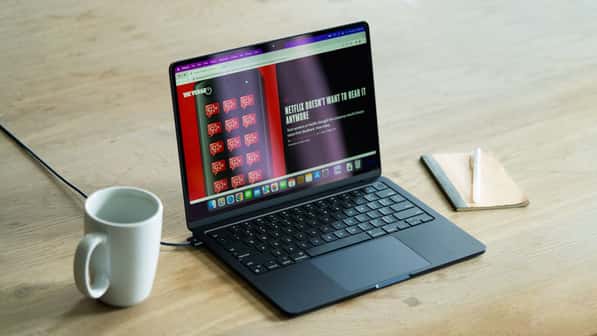
M2 MacBook Air review: a new Air-a
The
new MacBook Air has Apple’s latest in-house processor, the M2. It’s got
a better screen, thinner and lighter design, better speakers, a
much-improved webcam, an excellent keyboard and trackpad, more
convenient charging, and excellent build quality. It also comes with a
higher price tag
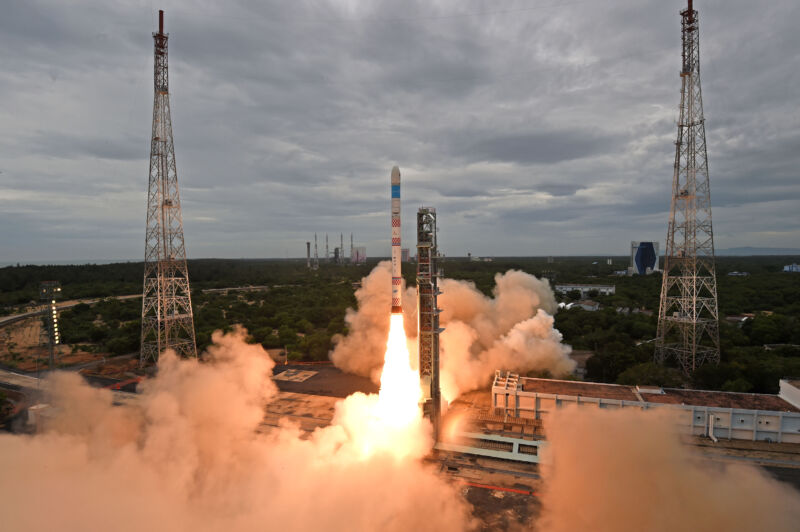
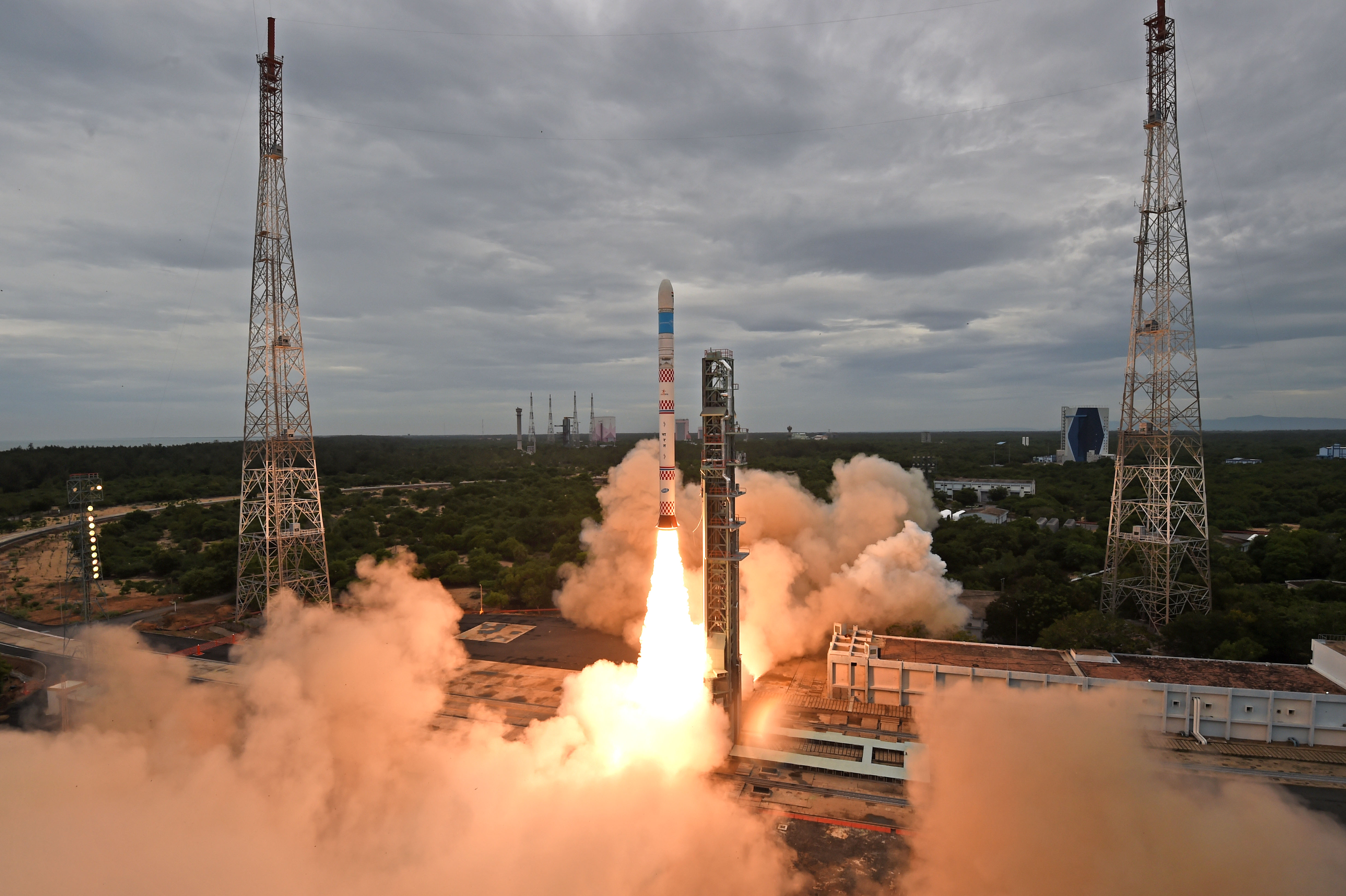
Enlarge/ India's Small Satellite Launch Vehicle takes flight on Sunday.
ISRO
Welcome to Edition 5.06 of the Rocket Report! The big news this week
is Northrop Grumman's deal with both Firefly and SpaceX to make sure it
can continue flying Cygnus spacecraft to the International Space
Station. This is a bold move that draws upon the deep US commercial
space industry in order to meet NASA's needs in space. It is great to
see this kind of cooperation in the aerospace community.
As always, we welcome reader submissions,
and if you don't want to miss an issue, please subscribe using the box
below (the form will not appear on AMP-enabled versions of the site).
Each report will include information on small-, medium-, and heavy-lift
rockets as well as a quick look ahead at the next three launches on the
calendar.
SpaceX firing up rockets in Texas again. SpaceX
ignited engines on both the first and second stages of its Starship
launch system this week, signaling that it is getting closer to a test
flight of the massive rocket later this year. On Monday evening at 5:20
pm local time in South Texas, engineers ignited a single Raptor engine
on the Super Heavy booster that serves as the rocket's first
stage. About three hours later, on a separate mount at its "Starbase"
facility in Texas, SpaceX ignited two engines on the Starship upper
stage of the rocket, Ars reports.
Getting closer to an orbital launch attempt ... These two
static firings, which are intended to test the plumbing of the rocket's
liquid oxygen and methane propellant systems, are significant. They are
the first static fire tests of 2022 at the South Texas launch site.
Moreover, these vehicles—dubbed Booster 7 and Ship 24 to reflect their
prototype numbers—could be the ones that SpaceX uses for an orbital
launch attempt. Finally, this is the first time SpaceX has test-fired
its new version of the Raptor engine, Raptor 2, on a rocket. On
Thursday, SpaceX performed a longer-duration firing of an engine on Booster 7.
Next three launches
August 12: Falcon 9 | Starlink 3-3 | Vandenberg Space Force Base, Calif. | 21:40 UTC
August 24: Falcon 9 | Starlink 4-23 | Kennedy Space Center, Fla. | TBD
And the first methalox rocket to orbit will be? The
race to build and launch the first orbital-class rocket powered by
methane continued to heat up this week as LandSpace rolled the
transporter-erector for its Zhuque-2 to a launchpad at the Jiuquan
Satellite Launch Center in China. (See satellite image). The rocket was not attached, but it's a sign that the company is getting closer to launching the medium-lift vehicle.
The methane race to space ... Methane has often been
discussed as the rocket fuel of the future due to its handling and
performance properties, but so far, no orbital rocket has used it. But
that could soon change, with SpaceX's Starship rocket, United Launch
Alliance's Vulcan, Relativity Space's Terran 1, and the
aforementioned Zhuque-2 all expected to come online soon. So which will
be first? If I'm handicapping the race, I'd say Terran 1 very likely
launches this year, with Starship somewhat likely, Vulcan very likely
delayed to 2023, and a big I-don't-know with regard to the Zhuque-2. We
should find out soon.
Russia launches satellite for Iran—with a catch. A
Russian Soyuz rocket launched the "Khayyam" spy satellite for Iran on
Tuesday, and the spacecraft will eventually be used to observe the
Middle East. But Iran will not take control of the satellite right away,
The Washington Post reports.
Instead, Russia wants to use the satellite to buttress its observations
of military activities in Ukraine. Accordingly, Russia has told Tehran
that it plans to use the satellite for several months, or longer.
Russia's new space buddies ... The spacecraft’s camera has a
resolution of 1.2 meters, Western security officials said. That’s far
short of the quality achieved by US spy satellites or high-end
commercial satellite imagery providers, but a substantial improvement
over Iran’s current capabilities. The cooperation with Russia comes
after Iran’s own attempts to launch military reconnaissance satellites
into orbit have largely been met with disappointment. (submitted by
Ildatch)
A glut of new rockets is on the way. So far the year
2022 has seen the debut of five new orbital rockets: China's Long March
6A, Russia's Angara 1.2, Korea's Nuri, Europe's Vega C, and China's
Lijian-1. But that is just the tip of the iceberg, reports Parabolic Arc.
As many as 20 orbital rockets could make their debut during the next 12
to 18 months, which would be unprecedented in the history of launch.
Some will fly, some will die ... The new launch vehicles
range from massive boosters such as SpaceX's Starship and NASA's Space
Launch System, to small satellite launchers capable of orbiting payloads
weighing 100 kg or less. Additionally, there are multiple rockets
designed to replace boosters that have been the mainstays of the launch
industries in Europe (Ariane 5), Japan (H2), and the United States
(Atlas V). Of course, not all of these rockets will reach the launch
pad, but it seems clear there will be no shortage of news for this
newsletter to cover in the coming months and years.
SpaceX sees continued demand for rideshare. Jarrod
McLachlan, director of rideshare sales at SpaceX, said the company
launched more than 400 customer payloads through its series of
Transporter missions and other rideshare opportunities with “several
hundred more” payloads manifested for launch, Space News reports.
"One of the questions that we’re getting a lot is, 'How full are you
guys?'" he said. "All the Transporters are fully manifested in 2023, and
we’re getting pretty full in 2024. We’ve really seen a strong market
demand."
Three flights a year ... SpaceX has performed five
Transporter missions to date, with another scheduled before the end of
the year. The company expects to average about three Transporter
missions a year, all to Sun-synchronous orbits, as well as occasional
rideshare opportunities on Starlink and other launches. While the
near-term manifest is full, McLachlan said there should be opportunities
for customers looking for last-minute rides to find a slot. This is
consistent with what I've heard from a couple of sources—that demand for
rideshares on Falcon 9 is really high, which is perhaps not surprising
given that it is currently the lowest price toll road to space.
(submitted by Ken the Bin)
Northrop partners with Firefly, SpaceX for Cygnus launches. Northrop
Grumman and Firefly Aerospace announced Monday they will work together
to develop a new first stage for Northrop’s Antares launch vehicle as
well as a future medium-lift rocket. The new version of the Antares,
called the Antares 330, will feature a first stage using seven Miranda
engines under development by Firefly, Space News reports.
The stage will also use Firefly composites for its structure and tanks.
It will be used as a long-term solution to launch the Cygnus spacecraft
to the International Space Station.
A big bet on Firefly propulsion ... The partnership would
solve Northrop’s current reliance on Ukrainian and Russian suppliers for
the Antares' first stage. The new Antares rocket will not be ready
until at least 2024, however, so Northrop is buying three SpaceX Falcon 9
launches for its Cygnus spacecraft to fill the gap until then. Cygnus
supplies food, water, experiments and other cargo to the space
station. Northrop and Firefly also said the partnership would lead to
the development of a separate “entirely new” medium-lift launch vehicle,
details of which the companies did not disclose. This is a big win for
Firefly as it seeks to stand out in the increasingly crowded US launch
market. (submitted by EllPeaTea and Ken the Bin)
NASA looking for new ride for TROPICS mission.
Astra's decision to retire the Rocket 3.3 vehicle has left four small
NASA satellites stranded. Although the first two TROPICS cubesats were
lost after a June 12 launch failure on a Rocket 3.3 vehicle, four
additional TROPICS cubesats were due to launch on two Rocket 3.3
vehicles. With this rocket no longer available, NASA is looking for
alternative options to launch the remaining TROPICS cubesats, Space News reports.
Probably not Astra ... "We are still looking for a ride and,
once the ride is found, we’ll launch it," said Sachidananda Babu, a
program manager in NASA’s Earth science division, during a NASA town
hall meeting at the Small Satellite Conference. Astra said it was
working with NASA to launch the cubesats on its new, larger launch
vehicle, but that rocket may be overpowered for the smallsats. (And it
may not be ready until at least 2024). Agency sources said Astra’s
announcement that the company was discontinuing the Rocket 3.3 took them
by surprise. Switching vehicles poses cost and schedule challenges that
NASA is still studying.
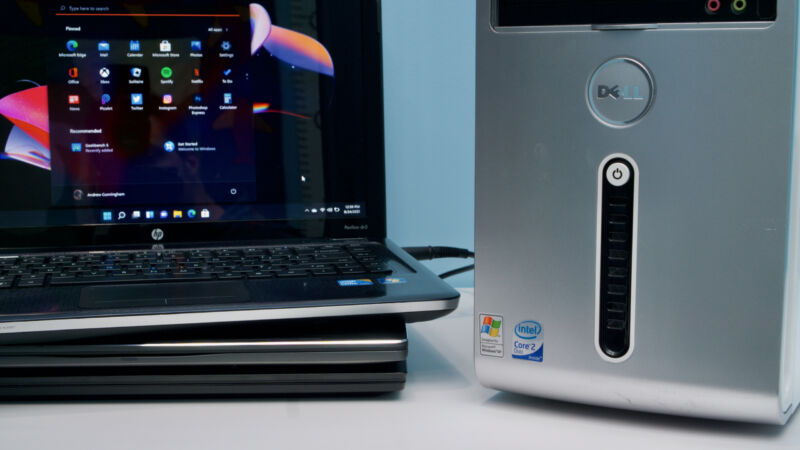
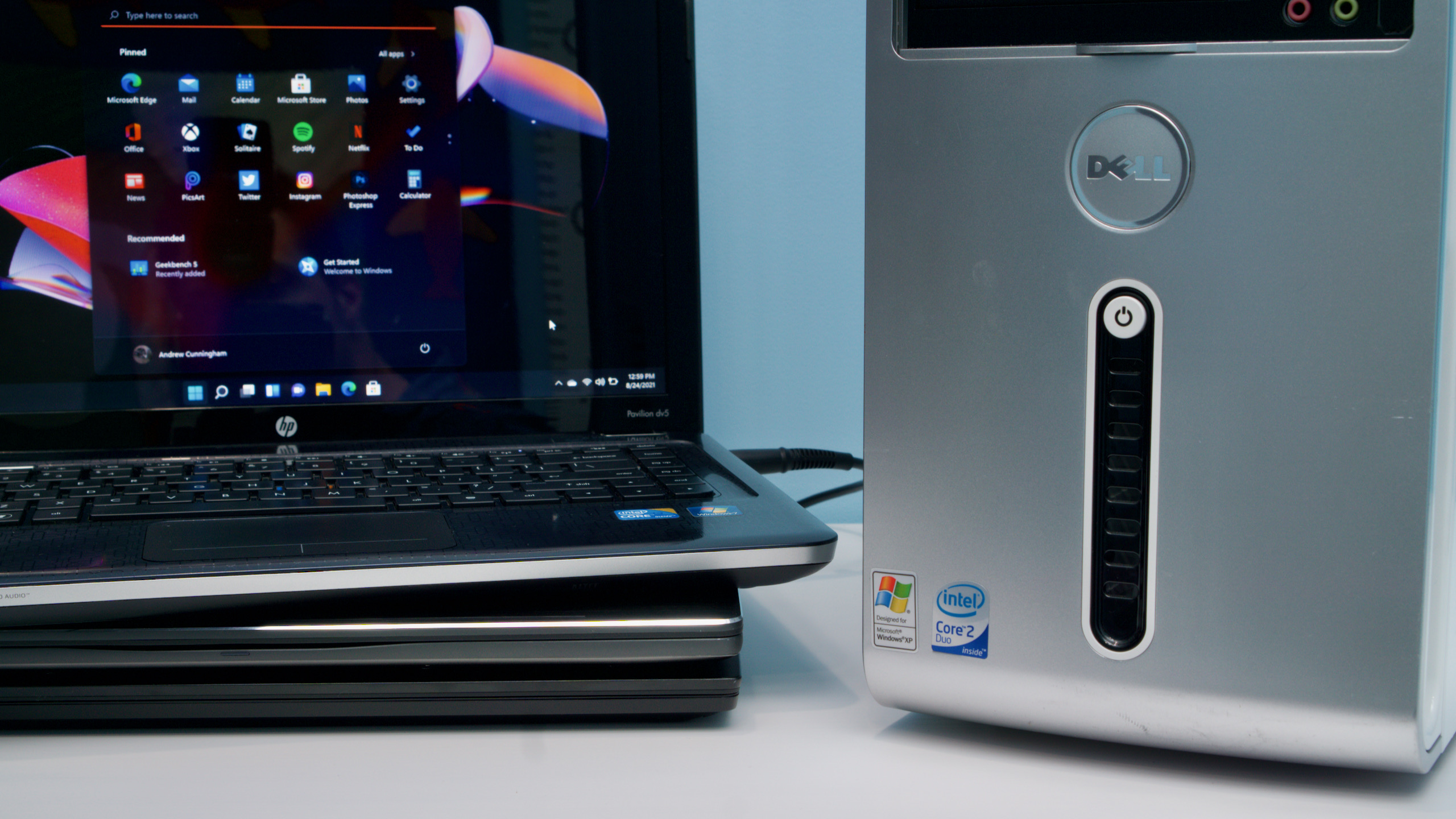
Enlarge/ You name it, we've tried installing Windows 11 on it.
Andrew Cunningham
We originally published this install
guide for Windows 11 shortly after the OS was released in October 2021.
To keep it current and as useful as possible, we updated it in August
2022 to cover tweaks that Microsoft has made to the Windows installer
for version 22H2, and some new workarounds for unsupported systems.
Windows 11 has been out for nearly a year, and its first major update will be released at some point in the next few weeks. Even if our original review didn't
convince you to upgrade, you might be thinking about it now that it's
more established and some of the biggest early bugs have been fixed.
We've pulled together all kinds of resources to create a
comprehensive install guide to upgrading to Windows 11. This includes
advice and some step-by-step instructions for turning on officially
required features like your TPM and Secure Boot, as well as official and
unofficial ways to skirt the system-requirement checks on "unsupported"
PCs, because Microsoft is not your parent and therefore cannot tell you
what to do.
I've had Windows 11 running on PCs as old as a Dell Inspiron 530 from 2008, and while I'm not saying this is something you should do, it is something that you can do.
The easiest way to get Windows 11 is by checking Windows Update on a
supported, fully up-to-date Windows 10 PC. But if you aren't seeing it
there, or if you have lots of computers to upgrade and only want to
download the new OS once, there are other options.
Microsoft offers several ways to download Windows 11 manually.
One is to use the Installation Assistant app, which you install on your
PC to trigger a normal upgrade install via Windows Update. The second
is to use the Windows 11 Media Creation Tool, which automates the
process of creating a bootable USB install drive or downloading an
install ISO file. Once you have a USB drive, you can either boot from it
to perform a clean install or run the Setup app from within Windows 10
to do a normal upgrade install. You can also burn the ISO to a DVD, but
installing from any USB drive, even an old USB 2.0 drive, will be much
faster, so you shouldn’t do that. Finally, you can just download an ISO
file directly from Microsoft’s site.
Do I need to pay for it?
Windows 11 is a free upgrade to Windows 10. So if you're running
Windows 10 Home or Pro on your PC, regardless of whether your PC is
officially supported or not, you'll be able to install and activate the
equivalent edition of Windows 11.
If you're installing Windows 11 on a new PC you've built yourself,
officially, you should buy a Windows 10 or Windows 11 license. These can
be purchased from retail sites like Amazon, Newegg, Best Buy, or directly from Microsoft for between $120 and $140. Unofficially,
you can buy a working Windows product key from product key resale
websites for anywhere from $15 to $40. Many of these sites are sketchy,
and we won't link to any of them directly, but it's one option for
getting a working key.
Also, unofficially, I've had some success using old Windows 7 and
Windows 8 product keys to activate equivalent editions of Windows 11.
It's an open secret that the Windows 10 installer would continue to
accept these older product keys long after the "official" free Windows
10 upgrade offer expired in 2016, and at least in our testing, those keys have continued to work for Windows 11.
What does my PC need to be “supported”?
Let’s reiterate the Windows 11 system requirements:
A "compatible" 1 GHz or faster dual-core 64-bit processor from Intel, AMD, or Qualcomm
4GB of RAM
64GB of storage
UEFI Secure Boot supported and enabled
A Trusted Platform Module (TPM), version 2.0
A DirectX 12-compatible GPU with a WDDM 2.0 driver
A 720p display larger than 9 inches in size
Windows 11 Home requires a Microsoft account and Internet
connectivity; Windows 11 Pro can still be used with a local account in
Windows 11 version 21H1, but in the 22H2 update, the Pro version will
also require a Microsoft account sign-in. There are workarounds for this
that we'll cover later.
The processor requirement is the most restrictive; supported
processors include 8th-generation and newer Intel Core processors as
well as AMD Ryzen 2000-series processors and newer. These are all chips
that launched in late 2017 and early 2018. Older computers can’t
officially run Windows 11. This is a big departure from Windows 10,
which made a point of supporting pretty much anything that could run
Windows 7 or Windows 8.
We get more into the reasoning behind these requirements (and whether they hold water) in our review. But the three big ones are the CPU requirement, the TPM requirement, and the Secure Boot requirement.
How can I tell if my PC is supported?
When you open Windows Update in Windows 10, it might tell you whether
your PC is supported or not. But the easiest way to check manually is
with Microsoft’s PC Health Check app. Early versions of this app weren’t very good, but the current version will tell you whether your PC is compatible as well as why it is or isn’t compatible.
If you aren’t using a supported processor, either plan to upgrade to a
CPU that is supported or skip ahead to the section where we talk about
installing Windows 11 on unsupported PCs.
If your processor is supported but you don’t meet the TPM or Secure
Boot requirements, the good news is that unless something is very wrong
with your PC, they should both be features you can enable in your PC’s
BIOS.
How do I get into my PC’s BIOS?
Usually, you can enter your BIOS by pressing some key after turning
on your PC but before Windows begins to boot. The key varies, but common
ones include the Delete key, F2 (for Dell systems), F1 (for Lenovo
systems), or F10 (for HP systems).
The consistent but more roundabout way of opening your BIOS is to go
to the Windows Settings app, then Windows Update, then Recovery, and
then Restart Now under “Advanced startup.” In the basic blue screen you
see next, click Troubleshoot, then Advanced options, then UEFI Firmware
Settings.
How do I enable my TPM?
Enabling your processor’s built-in firmware TPM is easy, but finding
the setting to do it sometimes isn’t. If you’re unsure what you’re
doing, try searching for “[manufacturer of your computer or motherboard]
enable TPM,” because many manufacturers have created help pages
specifically because of Windows 11.
For Intel systems, if you can’t find a setting marked “TPM” somewhere
in the chipset or security settings, look for “Platform Trust
Technology” or “PTT” and enable that. AMD systems usually just refer to
it as an “fTPM,” though you may also see it called the “Platform
Security Processor,” or “PSP.”
Once you’ve enabled your TPM, reboot into Windows and look at the
Device Manager or use the Health Check app to ensure it’s working
properly.
How do I enable Secure Boot?
Any computer made since Windows 8 was released in 2012 ought to
support Secure Boot, which helps prevent unsigned and potentially
malicious software from being loaded during your PC’s boot process. You
should be able to turn it on in your PC’s BIOS if it isn’t already
enabled, usually either in a “Security” or “Boot” section. As with
enabling your TPM, if you can’t find the setting, check your PC's or
motherboard’s manual.
If your computer won’t boot after you enable Secure Boot, don’t
worry—you just need to go through a couple of additional steps. Failure
to boot is most likely because your hard drive or SSD is set up with an
MBR (or Master Boot Record) partition table rather than the newer GPT
(GUID Partition Table) format that Secure Boot and UEFI both require.
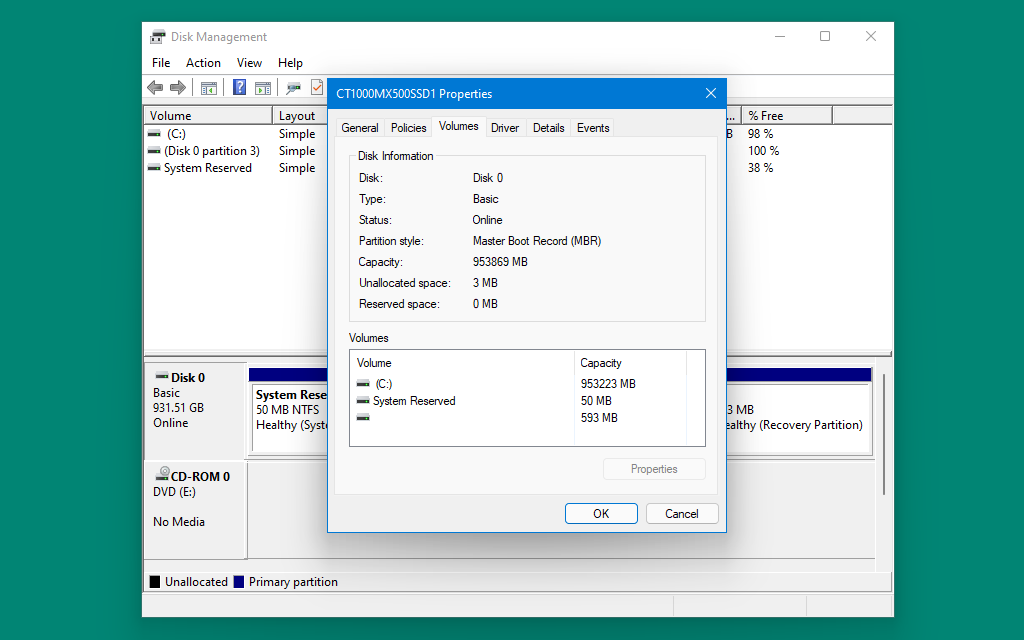
To check, right-click the Start button or use the Windows + X
keyboard shortcut and then click Disk Management in the menu that pops
up. Right-click whatever drive that Windows is installed on (in most
computers, it will be Disk 0, but not always if you have multiple hard
drives), then click Properties, then check the Volumes tab. If your
partition style is listed as MBR, that's when you'll need to convert the
drive.
If your drive uses the older MBR partition style, you will need to convert it to GPT before you can enable Secure Boot.
Andrew Cunningham
To convert from MBR to GPT in Windows 10:
Open Settings, then Windows Update, then Recovery, and click "Restart now" under "Advanced startup."
When your PC reboots, click the Troubleshoot button, then Advanced options, then Command Prompt.
In the Command Prompt window, type mbr2gpt /validate to check to make sure the drive can be converted. Then, type mbr2gpt /convert to convert the drive.
When it's finished, re-enable Secure Boot in your BIOS, and your PC should boot normally.
If this conversion fails for some reason, the easiest option may be
to do a clean reinstall of Windows 10 or 11 with Secure Boot enabled.
When you format the drive and install Windows from a bootable USB stick,
it will use GPT instead of MBR.
OK, what if my PC is unsupported?
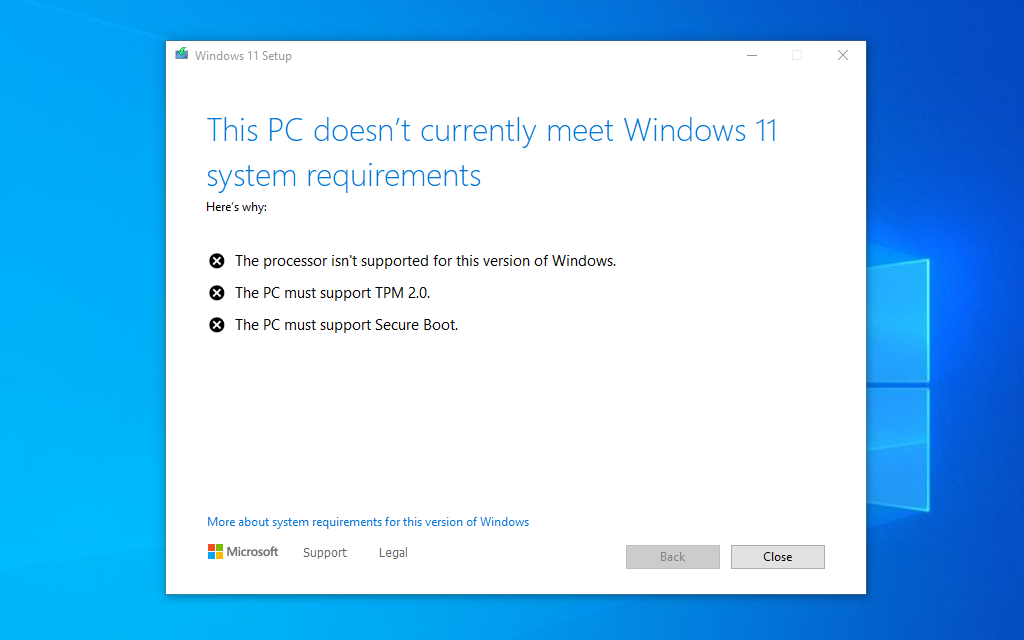
One
of many different versions of this screen that the Windows 11 installer
will show you if your PC doesn't meet the requirements.
Andrew Cunningham
Here’s where things start to get fun (and by “fun," I mean “frustrating and moderately risky”).
Officially, any PC that doesn’t meet all of Windows 11’s requirements
gets treated the same. Unsupported means unsupported, and Microsoft
doesn’t want you running Windows 11 on your PC. At all.
Unofficially, the Windows 11 installer distinguishes between two
broad groups of unsupported PCs: there are PCs that support Secure Boot
and have any kind of TPM at all, even an older TPM 1.2 module. And there
are PCs that are missing one or both of those features.
The short version is that if you bought your PC with Windows 8 or
Windows 10 on it, an unsupported installation isn’t too difficult. If
your PC was made to run Windows 7 or something even older (and if it
still meets the 64-bit processor and RAM requirements), then it’s more
difficult, and you really should just continue running Windows 10 on
those computers.
Installing on a PC with Secure Boot and any kind of TPM
If you’re running the Windows 11 installer from within Windows to
perform an upgrade install, the installer will refuse to run if your PC
fails to meet the CPU or TPM requirements. This barrier to entry will
keep casual users from downloading and installing Windows 11 on
unsupported computers easily.
But Microsoft has published a bypass
for those who really want to install Windows 11 on hardware that at
least supports Secure Boot and some kind of TPM. It requires a trip to
the Registry Editor, so tread lightly and ensure your important data is
backed up.
Press Windows + R and type regedit and press Enter to open the Registry Editor.
Navigate to HKEY_LOCAL_MACHINE\SYSTEM\Setup\MoSetup. Note that in my testing, the MoSetup
folder didn't exist until I had already run the Windows 11 installer
and allowed it to fail. You can create it yourself if it isn't there.
Right-click the MoSetup folder and create a new DWORD value named AllowUpgradesWithUnsupportedTPMOrCPU (this is case-sensitive, so pay close attention to the capital letters).
Double-click the entry you just created and change the value from 0 to 1.
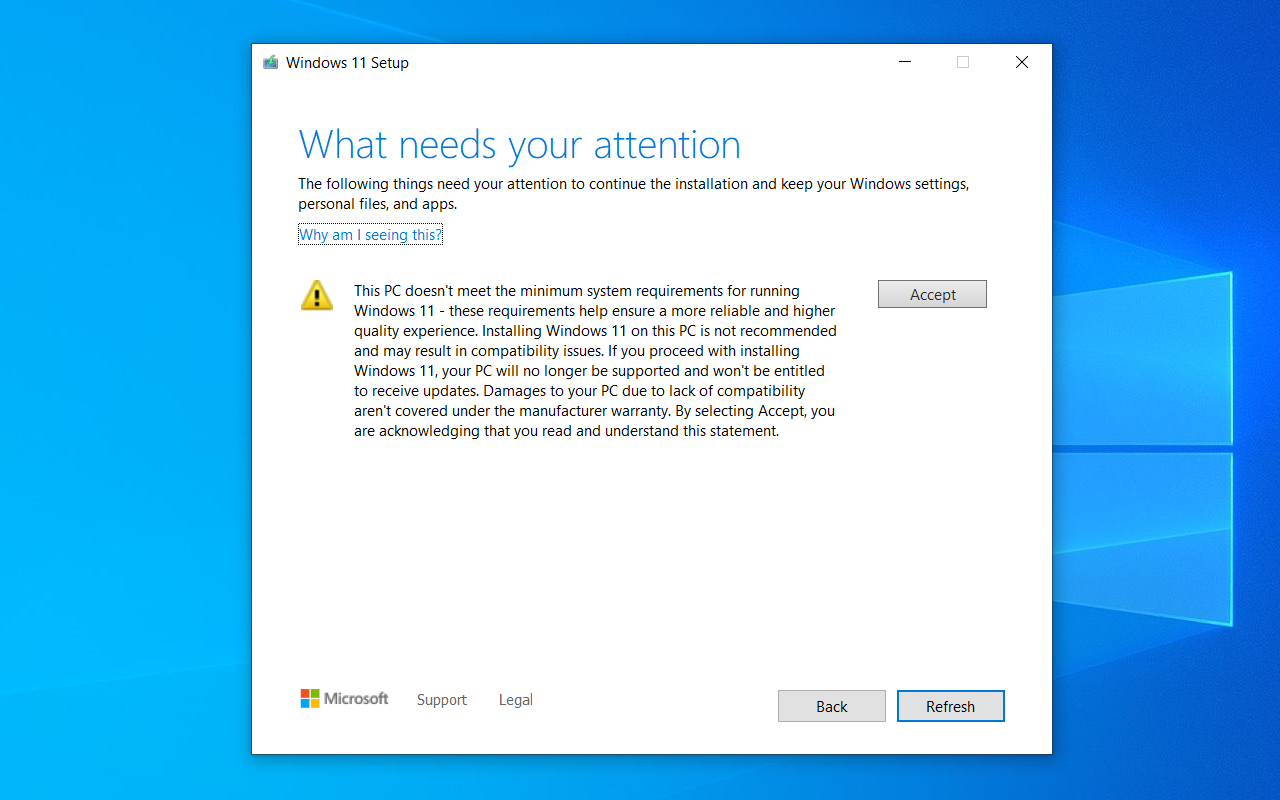
Windows 11 will now install normally, though you will see this update warning before you’re allowed to progress:
When
installing on a system with an older CPU or TPM 1.2 module, you'll need
to acknowledge seeing this warning about running on unsupported
hardware before you can proceed with an upgrade install.
Andrew Cunningham
If you just want to do a clean install from a bootable USB drive, the
Windows 11 USB installer will run normally on any PC as long as Secure
Boot is enabled and some flavor of TPM is present, no registry edits
required. This is convenient if you’re just installing Windows 11 for
testing purposes or if you typically do a clean install any time you
install a major OS update.
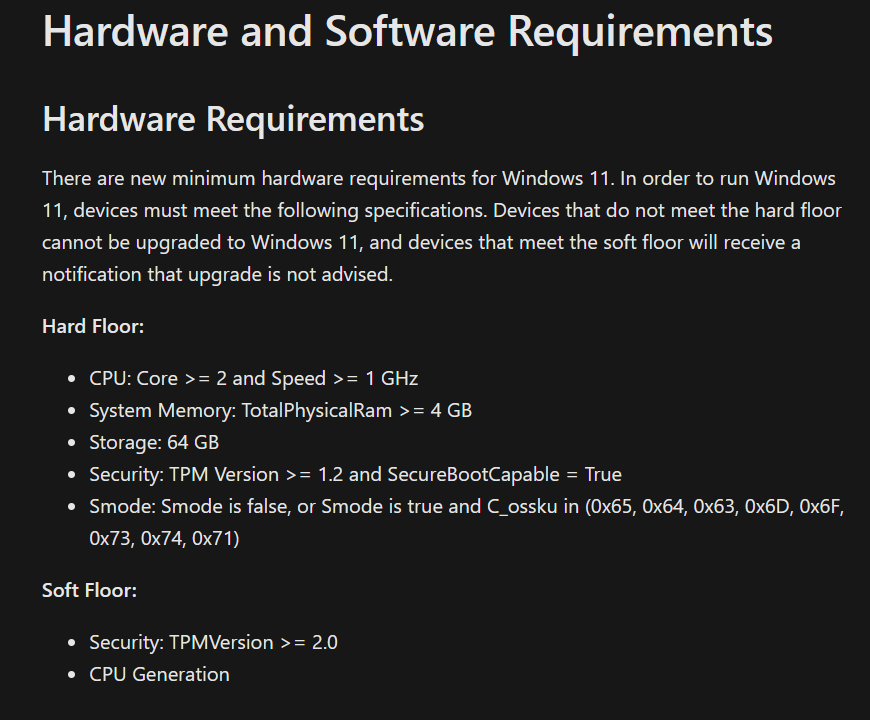
These
"hard floor" requirements, which Microsoft posted and then quickly
pulled from one of its sites after Windows 11 launched, seem to be what
the bootable USB version of the Windows 11 installer is looking for.
Microsoft
If you were paying close attention right after Windows 11 was
announced, you might remember that Microsoft briefly published a
document with both “hard floor” and “soft floor” requirements for
Windows, pictured above. Microsoft quickly removed this language, but
it’s worth noting that the “hard floor” specs do seem to be what the
bootable USB version of the Windows 11 installer is actually looking for
.jpg)


.jpg)

.jpg)
.jpg)